Scarlette Script: A Natural Signature Font for Handwritten Elegance
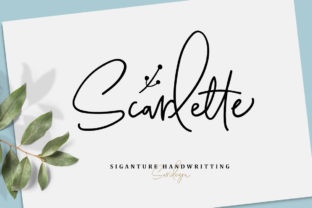
Scarlette Script is a natural-looking script font designed to mimic authentic handwriting. Its defining feature is an extensive set of contextual ligatures—automatically triggered character combinations that replicate the fluid connections and subtle variations found in real penmanship. This attention to typographic nuance gives Scarlette Script a warm, organic quality rarely achieved with digital fonts. Alongside the script, a complementary doodle-style font is included, intended for creative accents, logos, or illustrative elements rather than extended text.
Why Designers and Creators Consider Scarlette Script
People often seek Scarlette Script when they need typography that conveys personalization, elegance, or artisanal craftsmanship. It’s commonly evaluated for projects where tone and authenticity matter as much as legibility—such as wedding stationery, boutique fashion branding, handmade product labels, or social media graphics featuring inspirational quotes. Its natural flow makes it especially appealing for contexts where a human touch helps differentiate a brand or message from mass-produced alternatives.
Key Benefits and Realistic Expectations
One primary benefit of Scarlette Script is its expressive range. The built-in ligatures respond intelligently to adjacent characters, reducing the need for manual glyph substitution. When used correctly—especially in design software that supports OpenType features like Adobe Illustrator or Affinity Designer—the result closely resembles hand-lettered work without requiring illustration skills.
However, expectations must align with technical reality. Scarlette Script is not optimized for body text or long paragraphs. Its decorative forms and variable stroke widths reduce readability at small sizes or on low-resolution screens. It performs best at larger point sizes (24 pt and up) and in high-fidelity print or vector-based digital outputs. Users should also anticipate a learning curve when enabling and managing ligatures, particularly in less robust applications.
Where Scarlette Script Fits Well
Scarlette Script excels in focused, intentional applications. For example, it’s a strong choice for wedding invitations where the couple’s names appear prominently—its graceful curves and rhythmic spacing evoke timelessness and care. In fashion branding, it works effectively on garment tags, packaging, or website headers where visual identity hinges on subtlety and sophistication. Similarly, when paired with the included doodle font, it supports cohesive logo systems: the script handles names or taglines, while the doodle elements add custom flourishes, icons, or decorative borders.
It’s also practical for creators who want consistent, reproducible handwriting aesthetics across multiple assets—say, a series of quote-based Instagram posts or printable wall art. Unlike scanning or tracing actual handwriting, Scarlette Script offers uniformity, scalability, and easy color or weight adjustments without loss of fidelity.
Situations Where Alternatives May Be More Suitable
Scarlette Script is less appropriate when clarity, speed, or broad compatibility are top priorities. For web interfaces requiring responsive typography, system fonts or web-optimized scripts with simpler structures may render more reliably across devices and browsers. Likewise, if a project demands multilingual support beyond basic Latin characters—or includes numbers, punctuation, or symbols used frequently—the limited character set of many script fonts (including Scarlette Script) can become a constraint.
Designers working under tight deadlines may also find alternatives preferable. While Scarlette Script’s ligature system enhances realism, it requires careful proofing: automatic substitutions don’t always produce ideal results, and some word combinations may need manual glyph replacement. Fonts with fewer stylistic variants—like modestly connected scripts with static letterforms—can be faster to implement, especially for beginners or teams with limited OpenType experience.
Practical Evaluation Tips
Before committing to Scarlette Script, test it in your intended environment. Import a sample into your primary design tool and check how ligatures behave with common words in your project—names, phrases, or slogans you’ll use repeatedly. Pay attention to spacing between letters and lines; uneven tracking or awkward collisions can undermine the intended effect.
Review licensing terms carefully. Some versions restrict use in logos or require extended licenses for commercial distribution (e.g., selling templates or physical goods bearing the font). Confirm whether the license covers web embedding, app integration, or server-side rendering if those apply to your workflow.
Compare it against similar fonts—not just by appearance, but by functionality. Does another script offer broader language coverage? Does it include alternate characters or stylistic sets that better match your aesthetic goals? Tools like Google Fonts or Adobe Fonts allow side-by-side previews and filtering by features such as “ligatures” or “script,” helping narrow options efficiently.
Making a Purposeful Choice
Scarlette Script is not a universal solution—but it is a purpose-built tool. Its value emerges most clearly when the goal is evoking sincerity, refinement, or bespoke craftsmanship through typography. If your project centers on emotional resonance over functional neutrality—if you’re designing something meant to feel personally addressed or thoughtfully made—Scarlette Script warrants serious consideration.
Conversely, if your priority is rapid iteration, accessibility compliance, or adaptability across diverse platforms and languages, a more utilitarian typeface may serve you better—even if it lacks the same visual warmth. The strongest decisions come not from choosing the most beautiful option, but the one whose strengths directly support your specific objectives, constraints, and audience needs.
Ultimately, evaluating Scarlette Script means asking not just what it looks like, but how it behaves in context—and whether its expressive qualities meaningfully advance your communication goals.