Litesha Script: A Hand-Drawn Script Font for Expressive Design
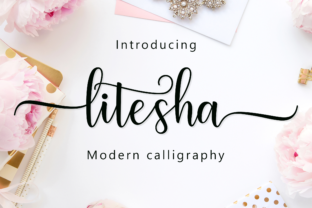
Litesha Script is a hand-made script font designed to evoke the warmth and individuality of natural handwriting. Unlike algorithmically generated scripts, it features carefully crafted letterforms with organic flow, subtle variations in stroke weight, and an intentionally human rhythm. Its defining characteristic is a rich set of stylistic alternates—swashes, ligatures, contextual forms, and discretionary glyphs—that allow users to fine-tune appearance without switching fonts.
People often explore Litesha Script when they need typographic personality for projects where legibility at small sizes is secondary to visual impact and emotional resonance. Common use cases include wedding invitations, boutique branding, editorial headlines, social media graphics, packaging for artisanal products, and short-form digital content like Instagram quotes or Pinterest pins. It’s not typically chosen for body text, data-heavy interfaces, or long-form reading—its strengths lie elsewhere.
One practical benefit is efficiency in expressive design. Because Litesha Script includes extensive OpenType features, designers can access alternate characters directly through compatible software (e.g., Adobe Illustrator, Photoshop, or Affinity apps) using glyph panels or contextual alternates. This means fewer manual adjustments and more consistent, intentional variation across words—helping avoid the “cut-and-paste” look that sometimes results from mixing multiple script fonts.
However, there are tradeoffs to consider. First, Litesha Script is a display-oriented typeface. Its connected letterforms and delicate terminals reduce readability below ~24 pt in most settings. Users expecting versatility across sizes or formats may find its application scope narrower than system or sans-serif fonts. Second, while the alternates add flexibility, they also increase the learning curve. Activating and managing them requires familiarity with OpenType features—not all design tools support them equally, and web implementation (via @font-face) often limits access to basic character sets unless carefully configured.
Another consideration is licensing. Like many premium hand-drawn fonts, Litesha Script is typically sold with tiered licenses—web, desktop, app, or extended use. Users working across platforms (e.g., designing a brand identity *and* building a website) should verify whether their license covers all intended uses. Free alternatives rarely offer comparable glyph diversity or authentic hand-drawn nuance, but they may suffice for low-stakes or experimental work.
Litesha Script tends to be a strong fit when three conditions align: the project prioritizes aesthetic distinction over functional neutrality; the text volume is limited (e.g., logos, headlines, short quotes); and the designer has control over typography execution—either through professional design software or a development environment that supports variable font features or robust web font loading.
Conversely, alternatives may be worth evaluating in several situations. If the goal is accessibility-first communication—such as public signage, educational materials, or government outreach—a highly legible, tested sans-serif or slab-serif will serve more reliably. Similarly, for responsive websites where text must scale cleanly across devices, a well-hinted, variable sans-serif offers greater predictability than a detailed script. And for multilingual projects, users should check Litesha Script’s language support: while it covers Latin-based Western European languages comprehensively, it does not include Cyrillic, Greek, Arabic, or East Asian scripts.
Practical decision-making starts with clarifying intent. Ask: Is the primary role of this text to convey information quickly—or to evoke a mood, reinforce brand voice, or stand out visually? If the answer leans strongly toward the latter, Litesha Script warrants serious evaluation. Next, assess technical context. Will the font be used in static print layouts, editable templates, or dynamic web environments? Desktop users with Adobe Creative Cloud will unlock the full range of alternates more easily than someone relying on Canva or Google Docs, which offer limited or no OpenType feature access.
Also consider consistency expectations. Because Litesha Script’s alternates introduce variability, two designers—or even one designer across different sessions—might produce noticeably different outputs from the same word. That’s a feature, not a bug, for expressive work—but it can complicate brand guidelines requiring strict typographic uniformity. In those cases, pairing Litesha Script with a neutral supporting font (e.g., a clean serif or geometric sans) for body copy or captions helps balance personality with clarity.
Testing is essential before committing. Download a trial version if available, and render sample text at intended sizes and backgrounds. Pay attention to how letters connect—especially common pairs like “Th”, “st”, or “er”—and whether spacing feels even or overly tight in your layout. Try exporting to different formats (PDF, PNG, SVG) to confirm glyph integrity. On the web, test fallback behavior: define a stack like Litesha Script, "Segoe UI", system-ui, sans-serif to ensure readability degrades gracefully if the custom font fails to load.
Finally, reflect on long-term maintenance. Custom fonts require updates, license renewals, and compatibility checks with evolving software versions. If the project will be handed off to non-designers or maintained by developers unfamiliar with typography nuances, simpler, widely supported options may reduce friction over time—even if they lack the charm of Litesha Script.
In summary, Litesha Script is a purpose-built tool—not a universal solution. Its value emerges when matched thoughtfully to specific creative goals: enhancing emotional tone, supporting artisanal or luxury positioning, or adding distinctive flair to short, high-impact text. It rewards intentionality and benefits from a clear understanding of its constraints. For readers evaluating script fonts, Litesha Script stands out for its depth of alternates and authentic hand-drawn quality—but its suitability depends less on what it *is*, and more on what you need it to *do*.